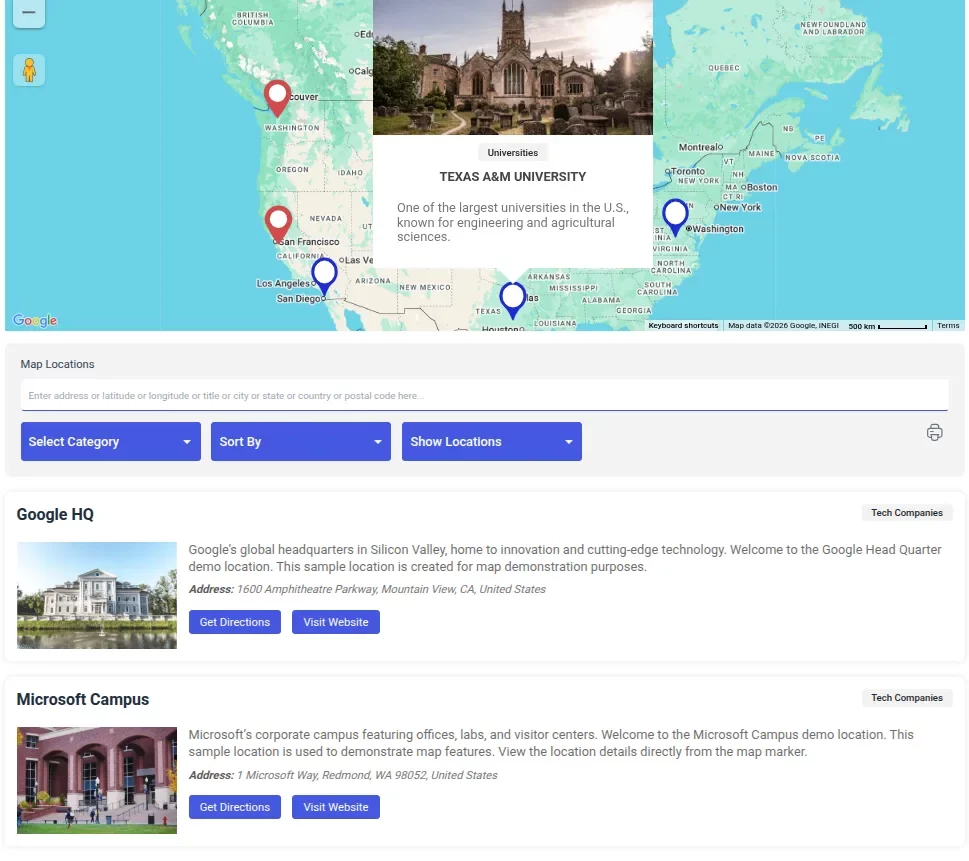
Looking for a free WordPress map plugin that does more than drop a pin? WP Maps includes search, filters, and listing along with the map for free — no upgrade required.
If you’re adding a map to your WordPress site, you probably don’t just want a pin on a page. You want visitors to be able to search, filter, and find what they’re looking for — whether that’s a store location, a listing, or a service area. That’s the difference between a map that’s decorative and a map that actually works for your business.
Here’s what WP Maps, a free WordPress map plugin, gives you — entirely free.
Choose Your Map Provider: Google Maps, OpenStreetMap & Mapbox
WP Maps supports Google Maps, OpenStreetMap, and Mapbox, and you can switch between them without losing your data. If you don’t want to set up a billing-enabled Google API key, OpenStreetMap works out of the box with no key required at all. You’re not locked into one provider’s pricing or setup requirements.
A Free WordPress Map Plugin With Search, Filters & Listings
Search, filters, and listings are basics of any map plugin — yet many free map plugins reserve them for the paid tier (worth cross-checking on WordPress.org before you decide). We built WP Maps to include all of this free: a map with search and filters, plus a listing displayed right below it. Whether you’re creating a store locator, real estate map, or business directory, visitors can quickly narrow down results instead of scrolling through dozens of pins. Sorting and pagination are included too, so longer lists stay easy to browse.
Store Locator Plugin
WP Maps includes full store locator functionality out of the box. Visitors can search for nearby listings within a specific distance range, so finding what they need is quick and easy. With WP Maps, you can launch a fully functional store locator or directory — no upgrade required.
Marker Clustering for Cleaner Maps
If you have more than a handful of locations, overlapping pins get unreadable fast. WP Maps includes backend marker clustering, grouping nearby markers together so your map stays clean and readable at any zoom level.
Draw Shapes and Define Service Areas
Need to show a delivery zone, a coverage area, or a custom region? WP Maps lets you draw circles, squares, polygons, and custom shapes directly on the map, with clickable or hoverable info windows for each one.
GDPR-Friendly Mapping by Default
Map embeds and geocoding requests can quietly send visitor data to third parties. WP Maps is built to be GDPR-compliant out of the box, so you don’t have to bolt on a separate consent solution just to stay compliant.
More Free Features Included
A few more things that come standard in the free version:
- Unlimited locations — no cap pushing you toward an upgrade
- Multiple maps on the same site, each with its own locations and settings
- Custom marker icons, including Snazzy Maps styling support
- KML/KMZ import, traffic, transit, and bicycling layers
- GeoJSON support for shape and region data
- Import/export settings via JSON, so you can move configurations between sites
- Responsive, mobile-friendly design that works with your theme and page builder
Who This Free WordPress Map Plugin Is For
- Store locators and business directories that need visitors to actually search and filter results
- Real estate or listings sites showing multiple properties on one map
- Anyone who wants a no-API-key option (OpenStreetMap) alongside Google Maps
- Sites that have outgrown a basic “map with a pin” plugin
Try WP Maps Free Today
Download WP Maps free
WP Maps plugin get regular updates – more features, UI improvements – every week and has more than 60000+ active users.
You can also explore some great WordPress plugins for your website here