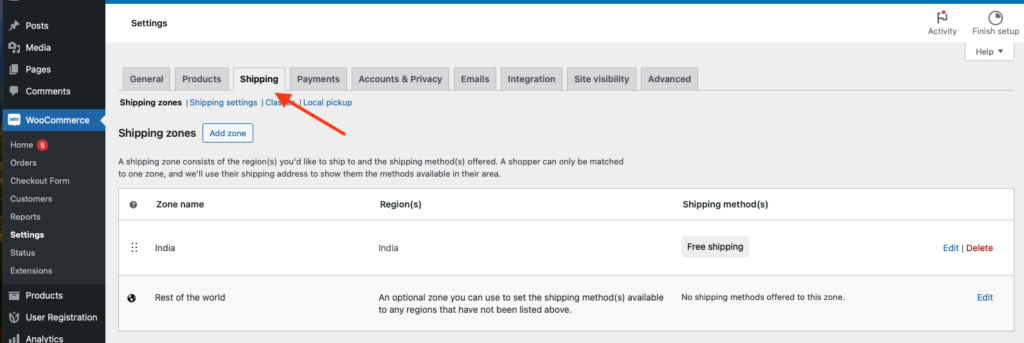
For any online store running on the popular WooCommerce tool, product shipping is an essential cost factor that needs to be considered. Practically every online store owner finds it challenging to decide whether to charge the customer for shipping or to incur the cost themselves. Among the effective methods, WooCommerce stores charge their shipping based on the zip code of the customer.
A WooCommerce shipping calculator can help you determine your shipping cost for any product. Effectively, a WP eCommerce shipping calculator can help you handle your customer’s expectations and experiences by providing the correct shipping rates to them in advance.
WooCommerce stores also need to base their shipping costs on the shipping services that they opt for. First, let us look at a comparison of the major shipping services available for eCommerce companies.
Comparing WooCommerce Shipping services
For WooCommerce companies, the shipping costs primarily depend on the core services provided by the shipping company. For example, do you need a shipping service that provides the following?
- Real-time shipment tracking to customers
- Guaranteed delivery date
- Insurance cover with every shipment
- Packaging material for each shipment
- Shipment of restricted materials like cannabidiol (CBD), perfumes, or any hazardous materials
For WooCommerce deliveries in the U.S, the most preferred companies are FedEx, USPS, and UPS. Each of these carriers offers shipment tracking and guaranteed delivery dates. However, while FedEx and USPS have a flat shipping rate, UPS charges a variable rate that depends on each package. Besides that, shipment of restricted materials is not available with all these services.
Each of these major shipping services also provides a free shipping calculator for eCommerce websites, which can be used to calculate the shipping cost for any customer order. Next, let us look at how to calculate the average shipping costs for any product delivery.
Calculating Product-wise shipping cost
How do WooCommerce shipping services calculate shipping costs? Here are some primary factors that determine the shipping costs for each product or package being delivered:
Package weight
Every shipping carrier sets its restrictions on the package weight and size. The package weight is among the most important factors that determine shipping costs. The higher the package weight, the higher the shipping cost. Thanks to its simple calculation, weight-based shipping costs are popular among WooCommerce services.
Package size
For some shipments, the package weight cannot be the sole determining factor. For example, lightweight products like pillows can occupy a larger space. In this scenario, the package size is the determining factor for calculating shipping costs. Typically, larger box sizes (to hold the products) can mean higher rates, even when they do not weight a lot.
Generally, shipping services calculate a dimensional weight (or DIM weight), which is calculated on the package dimensions (length, width, and height).
Travel distance
The third important factor is the travel distance or how far the package needs to travel to be delivered to the customer. The higher the distance, the more the shipping costs. Typically, eCommerce companies have a fixed cost for deliveries within the same shipping zone.
For deliveries in their local shipping zone (or the same location as the eCommerce store), companies can charge a low shipping rate (or even keep it free). For delivering to customers in other shipping zones, companies can charge a higher shipping rate or choose not to deliver to those areas.
Cost of the shipped product
Shipping costs can also depend on the value or cost of the product being shipped. For example, valuable items like gold ornaments or jewelry may need additional insurance, which needs to be included in the costs. Most shipping carriers determine this cost based on the declared value of the product.
Delivery time
Most eCommerce companies offer both standard and express deliveries to their customers. Express deliveries can incur a higher cost and can be included in the shipping costs.
Shipping volume and frequency
Larger eCommerce companies have higher shipping volumes and frequencies. They can sign up a shipping contract with any shipping service, where delivery charges can be negotiated.
For WooCommerce stores, it is crucial to know how to calculate a shipping cost and charge it to their shoppers. Let’s discuss this in the next section.
How to add shipping costs to your WooCommerce shop?
Primarily, there are three ways in which WooCommerce shops can add shipping costs:
Cover shipping costs as part of the product base price.
This method is typically used when eCommerce companies want to offer free shipping to their consumers. The average shipping charge is added to the base price of the product. This can be a risky strategy as a low product price may result in a loss of revenue for each sale.
To implement this method, add a specific amount for shipping to each product being offered – and then enable “free shipping” in your WooCommerce settings.
Configure a fixed shipping fee.
The second method is to configure a fixed shipping fee in WooCommerce based on the shipping zone and class. For instance, you can categorize your products according to classes for small, medium, or large items. Further, you can set the shipping charge for each of these product categories for deliveries in the same shipping zone. Additionally, you can use this method for configuring discounts or free shipping for different product bundles or bulk orders.
No matter how you configure it, you need to inform the customer about the free (or flat) rate that they need to pay.
Assign a dynamic shipping quote.
The third method is to assign an updated shipping rate based on WooCommerce extensions provided by the three shipping services. For example, the USPS Flat Rate Shipping extension can charge a flat rate based on the size of the product package. Similarly, you can generate live price quotes based on the product weight or other factors.
WooCommerce site users can also use a WooCommerce shipping calculator plugin to calculate accurate shipping rates for each product delivery. Flexible Shipping is a popular WooCommerce website shipping calculator plugin. Next, let us learn more about this plugin.
About Flexible Shipping plugin
The Flexible Shipping plugin for WooCommerce shipping calculation is among the best plugins for table rate shipping. With this plugin, you can calculate the shipping costs based on the package weight or the total value of the shopping cart. The plugin has over 100,000 active installations and is available with both a free and PRO (or paid) version.
Features of Flexible Shipping
- Unlimited shipping methods
- Excluding shipping methods based on the user’s role
- Shipping cost is based on weight, cart total, number of cart items, and shipping classes
- Minimum and maximum values for package weight and cart total
- Override option to allow free shipping for orders (above a selected amount)
- Multiple rules for cost calculation
How To configure and use it
- From your WordPress dashboard, navigate to your WooCommerce settings page.
- From the “Shipping” tab, select (or add) the shipping zone that you want to use. For example, the USA.

- Next, add the shipping methods that are available for this shipping zone, then choose “Flexible Shipping” as the method.
- Next, you need to edit the “Flexible Shipping” method with the following options:
- Method description
- Tax status (as taxable or non-taxable)
- If taxable, specify if you want to enter shipping costs with (or without) applicable taxes.
- Free shipping: specify the order amount over which the customer will be provided with free shipping. You can additionally specify the free shipping label (to be displayed on the customer page) and indicate the amount left for free shipping.
- Next, you need to configure the “Cost Calculation” settings based on the following parameters:
- Rules Calculation: for the free plugin version, the only option is “Sum,” which adds up all the specified rules.
- Next, add the shipping calculation rules based on cart price and package weight. Alternatively, you can use ready-made scenarios that contain existing rules.
- Save all the changes.
Conclusion
The WooCommerce Shipping Calculator ensures that eCommerce companies can calculate the right shipping costs based on the available shipping services. As discussed, the Flexible Shipping plugin offers an easy way to configure shipping rates for your WooCommerce site.
At WePlugins, we provide a variety of WooCommerce development services that can help you achieve your business goals. If you are looking for any help in WooCommerce website development, request a quote today.