WordPress Multilingual Plugin development is super easy and increases your target audience. At WePlugins, our developers strictly follow the multilingual approach in any type of WordPress development.
Instead of defining ‘Internationalization’ or ‘Localization’ words theoretically, I’d like to develop a WordPress multilingual plugin from scratch so you can understand this perfectly.
Create “Hello World!” Multilingual Plugin
Assuming you have little idea about wordpress plugin development, to start off, below is simple plugin code which creates two navigation and displays a dummy output.
/*
Plugin Name: WordPress Multilingual Plugin Tutorial
Description: Learn how to make a WordPress Multilingual Plugin.
Author: flippercode
Version: 1.0.0
Author URI: https://weplugins.com
*/

if(!class_exists('weplugins_Multilingual_Tutorial'))
{
    class weplugins_Multilingual_Tutorial
    {
        /**
         * Construct the plugin object
         */
        public function __construct()
        {
            add_action('admin_menu', array($this, 'weplugins_multilingual_menu'));
        } // END public function __construct

        public function weplugins_multilingual_menu()
        {
            add_menu_page(
                'Multilingual Tutorial',
                'Multilingual Tutorial',
                'manage_options',
                'multilingual-tutorial',
                array($this, 'weplugins_func_multilingual_tutorial')
            );

            add_submenu_page(
                'multilingual-tutorial',
                'Sub Menu',
                'Sub Menu',
                'manage_options',
                'multilingual-tutorial-submenu',
                array($this, 'weplugins_func_multilingual_tutorial_submenu')
            );
        }

        public function weplugins_func_multilingual_tutorial()
        {
            echo "Hello, World is here";
        }

        public function weplugins_func_multilingual_tutorial_submenu()
        {
            echo "Hello, World is here";
        }
    }
}

// instantiate the plugin class
$weplugins_multilingual = new weplugins_Multilingual_Tutorial();
If you change your WordPress language using `define(‘WPLANG’, ‘hi_IN’);` in wp-config.php, this plugin doesn’t have any effect because it is not multilingual compatible WordPress plugin.
Below are simple changes we’ll do in this plugin to make it multilingual.
Define Strings using __() or _e() Functions: Whenever you define a string or label of input element or paragraph, always use __() or _e() functions. To output a translated string, use _e($text,$domain) function, where $domain is the key which is used to fetch the translated string from language files. This is known as ‘text domains’ which should be unique for a plugin.
Loading language files: When plugin loaded, we need to load the required language file according to selected languages in wp-config.php. WordPress handles this with help of load_plugin_textdomain() function. Use the ‘plugins_loaded’ action and call load_plugin_textdomain() function when plugin loaded.
Here assume that all languages file located in the languages folder within the plugin folder. So below is the complete source to make above plugin a multilingual.
Create Languages Files in WordPress
To create languages files in WordPress, we use poedit software. Here are easy steps to create a .po file for your plugin on Creating POT Files.
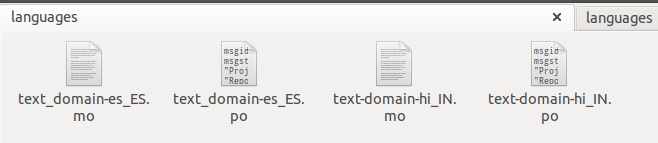
Below is the screenshot of .po files for English and Hindi languages.
Languages Files for WordPress
Did you notice file names here? It should have {domain}-{language_code}_{country_code}.po format. Here our {domain} is ‘text-domain’, {language_code} is ‘hi’ (Hindi) and {country_code} in ‘IN’ (India) so file name is ‘text-domain-hi_IN.po’.
While WordPress defaults to English, changing the language is a straightforward process. Let’s walk through the steps to switch your site’s language to Hindi, which uses the locale code ‘hi’ and country code ‘IN’.
Step #1: Open your wp-config.php file and locate the line define(‘WPLANG’,”). Change it to define(‘WPLANG’,’hi_IN’) to set Hindi as the language.
Step #2: Ensure that the Hindi language files (hi_IN.mo and hi_IN.po) are present in the wp-content/languages folder. If these files are missing, you can download them and place them in the correct directory. Remember, your plugin’s language files should be located in the your-plugin-path/languages folder, while WordPress translation files belong in wp-content/languages.
Step #3: Refresh your WordPress page, and you should now see the interface displayed in Hindi.
By following these steps, you can effectively test and verify the functionality of a multilingual plugin.
Conclusion
By applying some small steps, you can make your plugin or themes multilingual. The first time, you create an English version .po file and distribute that to the translator. You can place any number of languages files in your languages folder. More languages you’ll provide, more download you get on codecanyon or official repository.
Sandeep Kumar Mishra writes about WordPress and Artificial Intelligence, offering tips and guides to help you master your website and stay updated with the latest tech trends.
Related Posts
Explore related articles covering connected topics, practical insights, and useful guides.
This website uses cookies so that we can provide you with the best user experience possible. Cookie information is stored in your browser and performs functions such as recognising you when you return to our website and helping our team to understand which sections of the website you find most interesting and useful.
Strictly Necessary Cookies
Strictly Necessary Cookie should be enabled at all times so that we can save your preferences for cookie settings.
If you disable this cookie, we will not be able to save your preferences. This means that every time you visit this website you will need to enable or disable cookies again.
3rd Party Cookies
This website uses Google Analytics to collect anonymous information such as the number of visitors to the site, and the most popular pages.
Keeping this cookie enabled helps us to improve our website.
Please enable Strictly Necessary Cookies first so that we can save your preferences!