The Internet is a wide storehouse of a variety of online content. However, the flip side is some content may not be appropriate for younger users, who are likely to be influenced by them. For instance, minors must be kept away from websites related to pornography, alcohol, smoking, gambling, and more.
For WordPress sites, these restrictions can be easily achieved by setting up age verification using WordPress plugins. On their part, WordPress age verification plugins are easier to configure instead of adding customized code to your website.
What are WordPress Age and ID verification – and how can you set them up using WordPress plugins? Let’s discuss this in the following sections.
What is WordPress Age verification?
To put it simply, WordPress age verification is the process that determines if a particular user should be allowed to access a WordPress site based on their current age. Although age-related restrictions are not mandatory in most jurisdictions, website owners are recommended to set up age-related restrictions depending on the type of posted content.
Age-based verification is gaining importance in today’s world of online browsing and social media platforms. For example, age verification is necessary for eCommerce stores where selected products are not intended for underage minors. Similar, age verification can also be integral to any company’s KYC checks.
Here are some of the online businesses that require age verification:
- Social media platforms and dating apps, which require the minimum age of customers to be at least 16-18 years old.
- Every form of gambling business including online gambling, betting, lottery services, and casinos.
- Cryptocurrencies where only users above 18 years old are allowed to trade in digital currencies.
What is WordPress ID verification?
Simply put, ID verification is similar to age verification but is used to verify the individual’s identity instead of their age. It is used to verify if only authorized users are trying to access a website’s resources or content. Just like age verification, ID verification is deployed on websites with sensitive information.
Why is ID-based verification gaining importance? Efficient ID verification can protect both business and customer data from online frauds and data breaches. How does it work? ID verification works by comparing the person’s available resources (for example, identity documents, photographs, biometrics) with the person’s verified information stored with the business.
Next, let’s discuss the best way to verify ID and age for WordPress websites.
WordPress plugins for ID and Age verification
You can easily set up an ID and age-related restrictions on your WordPress site using WordPress plugins. There are a host of WordPress Age Verification plugins like AgeVerify and Age Gate that is easy to install and configure. These plugins do not allow users to enter the website before they have confirmed their current age.
Similarly, there are a host of WordPress ID Verification plugins like “SAML SP Single Sign On” and “BlueCheck Photo ID Verification” that require some form of ID verification to be provided before users are allowed to enter any website.
Next, let’s talk about the features and capabilities of the WP Age Gate Pro plugin from Flipper Code.
About the WP Age Gate Pro plugin
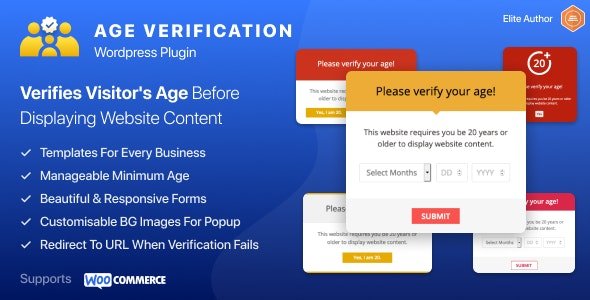
The WP Age Gate Pro plugin from Flipper Code is among the advanced age verification tools for WordPress sites. This plugin can effectively verify the website visitor’s age before they can view the contents of your website. Additionally, you can apply age-related restrictions to individual pages, posts, and customized elements on your WordPress site.
Here are some WP Age Gate Pro plugin features that provide value for your money:
- Comprehensive age verification system
As mentioned, you can configure this plugin to set up an age verification system on the entire website or the various website components including:
- Specific blog posts
- Webpages
- Custom Post Types
- Post categories
- Product categories
- WooCommerce product pages
- Beautiful and responsive pop-up forms for age verification
With WP Age Gate Pro, you can choose from over 20 beautiful and responsive pop-up templates for asking and confirming the visitor’s age. You can choose the right template for individual website pages or posts. Besides that, there are 12+ responsive templates for websites related to alcohol and smoking.
- Customizable images
This plugin allows you to save your customized image as the popup and overlay background. Additionally, you can customize the position of the background and popup image.
- CSS3 image filters for background images
You can enhance the overall look of your age verification popups with image filter effects such as blur, saturate, hue rotation, and changing contrast.
- Popup colours and typography
The WP Age Gate Pro plugin enables you to customize age popups using various colour combos and text typography. This includes elements like:
- Heading font size and line height
- Base font size and line height
- Popup background colour
- Heading and Text colour
- Border colour
- Button and button background colour
- Additional plugin settings
You can configure additional settings for the WP Age Gate Pro plugin on your website. These settings include:
- The visitor’s minimum age (default value is 20)
- The remember days for each visitor (the default value is 30)
- Display the website without redirecting
- Display the appropriate age verification form for:
- Logged in users
- Home page
- Specific pages
- Specific posts
- Specific types of posts
- Specific product categories
Here are some more reasons why you should invest in the WP Age Gate Pro plugin:
- You can create your HTML/ CSS template file and upload it as your popup template skin.
- This is the only WordPress plugin that supports WooCommerce websites. You can now apply age verification for selected products or product categories on your WooCommerce store.
- This plugin is 100% compatible with WPML – meaning you can request the visitor’s age in their preferred language.
Conclusion
As compared to custom coding, it is much easier to set up age verification with WordPress plugins. Through this article, we have discussed the importance of the visitor’s ID and age before they can open any website.
At WePlugins, we have worked on a wide range of WordPress plugins that improve the functionality of our customer websites. For instance, here is how you can set up a recurring delivery in WooCommerce sites.
Are you looking to develop your plugin functionality? We can help you. Drop us a message with your query.