Do you want to direct your customers to your retail store, office, or hotel? The easiest mode of showing the best routes & directions is a WordPress map plugin. If you are running your website on the popular WordPress platform, then the WordPress maps plugin is the best way to list a location or display the quickest route from any place.

Among the best available interactive maps, Google Maps allows smartphone users to find the most efficient route and directions to their marked location. All that you need to enable this feature is to install a Google Maps plugin for WP (or WordPress) site.
The WP Maps Pro plugin from Flipper Code is an efficient and advanced Google Maps plugin for WordPress sites. Before we learn more about this plugin, let us first understand why any business must deploy interactive maps on their WordPress site.
Business Advantages of Interactive Maps
With over 150 million users and 5 million websites, Google Maps is easily the most popular navigational map used by Android users around the globe. Here are some of the business benefits of showing navigational maps and routes with a WordPress Maps plugin:
- Easy to use on a variety of mobile devices, thus enabling access to potential users of your business.
- With real-time traffic data, interactive maps show online users the best available route to reach your business site.
- Displays the exact location of your business office or store – to direct potential customers to the correct address.
- Compatible with business enterprises with offices (or stores) spread across multiple locations.
- Displays the real-time interactive map in a variety of formats including road maps, satellite images, or geographical terrain.
- Improves the SEO ranking and visibility of your local business for search engine users.
Next, let us discuss how to add interactive Google Maps without investing in Google Map plugins.
How to add Google Maps to WordPress
First, let us see how to add interactive Google Maps to your WordPress site without investing in any map plugin.
- Open the Google Maps site and search for the exact address of your business location.
- Click the “Share” icon for the following options:
- “Send a location” link
- “Embed a map” link
- Click the “Embed a map” link, and then copy the displayed HTML code.
- Open the webpage where you want to add the interactive map.
- From the Block Editor tool, click the “Custom HTML” option and paste the code copied from the Google Maps website.
- Save and publish the webpage to view embedded Google Maps.
While this is a faster method, it does not provide your business with the range of benefits that we discussed in the previous section. Next, let us discuss the functionality of the WP Maps Pro plugin from Flipper Code.
About the WP Maps Pro plugin
The WP Maps Pro plugin is the easiest mode of displaying beautiful and interactive maps on your WordPress website. Among the main benefits, this WordPress map plugin displays your real-time location on any device in just a few seconds.
Here are some WP Maps Pro plugin features that provide value for your money:
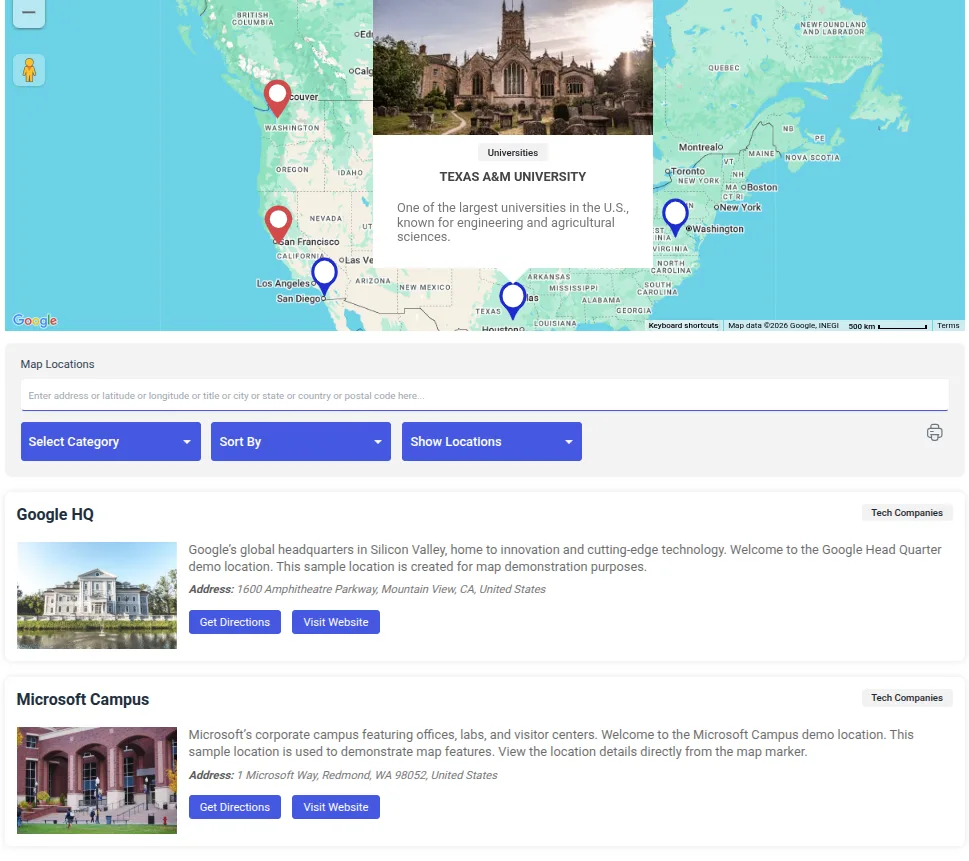
- Displays multiple locations
With this plugin, your admin user can create multiple locations using Google Auto-suggest and assign them to the interactive map. You can assign easily identifiable markers at the assigned locations on the map. Additionally, you can display your business listing as real estate, restaurant, university, or any other custom post type.
- Filter location based on category
With this feature, website visitors can easily filter the map based on defined marker categories. For instance, the “Real Estate” category can have sub-categories like Apartment, Villa, or based on the number of bedrooms. Your website admin can easily create these sub-categories – and assign a unique marker icon to each sub-category.
- Display multiple routes
With this feature, you can now display multiple routes between specific locations on your map. Your website admin only needs to specify the start and end location – and the best route is generated automatically on the map.
- Display directions
With this plugin, website visitors can easily find directions with detailed instructions on how to reach the end location. To do this, they only need to enter the start and end locations. A complete route is then automatically generated and displayed to the visitor.
- Displays additional amenities
With this feature, website visitors can also search and find other amenities around the specified location. Amenities include banks, petrol pumps, restaurants and cafes, hospitals, and movie theatres.
- Displays multiple clusters
If you are running a business with multiple locations, you can display them all using clusters. For instance, a group of markers can be displayed as map clusters at a given zoom level.
Besides these features, the WP Maps Pro WordPress plugin allows you to display multiple maps, automatically find the geo-location of any place, and customize map displays – meaning map types, zoom levels, font size, and color schemas.
Conclusion
Using Google Maps, you can enhance the interactive design of your local business website using visually-rich maps. With a user-friendly WordPress maps plugin like WP Maps Pro, you can easily guide your potential customer to single (or multiple) locations of your business. Using the best available routes and directions, interactive Google Maps on your business site can improve customer satisfaction, thus ensuring more engagement and business revenues.
With years of expertise in WordPress development, Flipper Code provides a range of Google Maps plugins with a host of new functionalities. Our new Google Maps platform enables you to add a new Google Map without any coding requirements.
Are you looking to customize your WordPress maps for your business need? We can assist you. Just drop us a message.