WordPress Introduces an Official Browser Extension
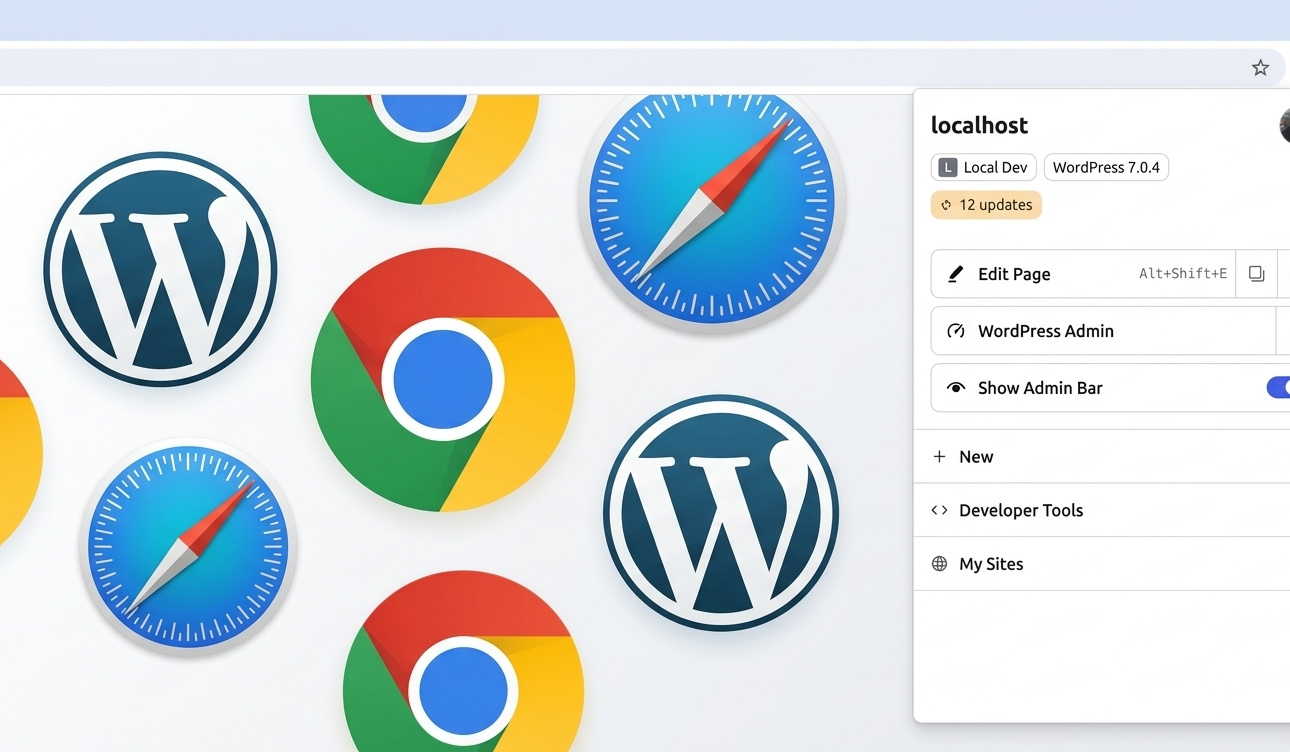
WordPress has released an official WordPress Browser Extension, now available for Google Chrome and other Chromium-based browsers through the Chrome Web Store, as well as for Safari on macOS via the Mac App Store. The extension is open source and designed to give logged-in WordPress users more control over their browsing experience while adding convenient tools for developers and content creators.
Hiding Admin Bar For Logged-in Users
By default, the WordPress admin bar appears at the top of every page for signed-in users, offering quick access to the dashboard, editor, and profile settings. However, this bar takes up space in the viewport, which can create a mismatch between what a logged-in user sees and what a regular visitor sees. This becomes especially noticeable on sites using sticky headers or scroll-based effects, where the admin bar can introduce visual glitches unrelated to the site’s actual code.
Previously, turning off the admin bar through profile settings removed those visual issues but also removed its useful shortcuts. The new WordPress Browser Extension was built to resolve this tradeoff.
Key Features of the Browser Extension
- Hides the admin bar on selected sites or by default across all sites, while keeping the most-used shortcuts accessible from the browser toolbar.
- Allows users to restore the full admin bar in just two clicks.
- Displays whether the current website runs WordPress and whether the user is signed in, directly from the toolbar icon.
- Provides direct shortcuts to the dashboard or editor for the specific post, page, taxonomy, or template being viewed, including template-based pages that open in the Site Editor on block themes.
- Includes a locally stored launcher that remembers previously signed-in sites for quick access.
Built-In Tools for Developers and Content Creators
Beyond managing the admin bar, the extension includes several tools better suited to a browser environment than a WordPress plugin. These include the ability to:
- Draw block boundaries over a rendered page.
- Open a phone-sized preview window for testing responsive layouts.
- Reload a page with cache busting.
- Clear cookies and local storage for the site currently being viewed.
None of these tools require installing a plugin or any other software on the website itself, making them available across any WordPress site the user visits.
Privacy and Data Handling
According to WordPress, all extension functionality runs locally on the user’s device. The extension reads the page to determine relevant information and only communicates with the site itself when additional data is needed. User preferences and the list of sites a user signs into are stored locally in the browser. WordPress states that no data is sent elsewhere, and the extension includes no tracking or analytics.
The WordPress Browser Extension began as an independent project before becoming an official WordPress project with support from Matt Mullenweg. Notable contributors include Fabian Kägy, a WordPress core contributor who helped shape its early design and architecture, and Khokan Sardar, who contributed multiple patches. Additional testing and input came from several colleagues at Fueled (formerly 10up).
The project’s development is publicly tracked on GitHub, where bug reports and pull requests are welcomed.
Recommended External/Official Links:
Source: WordPress News
We have also curated a list of best plugins that you can use on your wordpress website in 2026. You can find out here