In this guide, you will learn to apply infinite scroll on your blog posts list without any coding. The WordPress infinite scroll function is a terrific way of keeping your online users engaged with your content.
Why is it so effective? Simply put, your online visitors can enjoy an uninterrupted flow of web page content without having to click any button to move to the next page.
In other words, the WordPress endless scroll feature keeps your users “hooked” for more time on your web page. This will lead them to explore more content on your website and increase the pageviews. In this blog, we shall understand how infinite scroll works and how to add one to your WordPress page.
What is the Infinite Scroll technique?
An infinite scroll is a web designing technique that continuously loads additional content as users scroll down a web page. Before the emergence of the infinite scroll, pagination was used to distribute the content across multiple pages. Users had to typically scroll down to the end of the page and then click the “Next” button to view the next page.
The infinite scrolling technique effectively eliminates the need for pagination. It uses AJAX to automatically load page content when a user scrolls a web page. How is it beneficial? This technique is a frictionless mode of presenting long content and keeping users engaged (without having to click any button). Infinite scrolling is viewed as a more intuitive way of displaying page content to any user.
An interesting example is that of the Google search engine. For search results on the desktop, it uses pagination. However, for mobile searches, Google uses the infinite scroll where search results are automatically added once the mobile user reaches the end of the displayed result page.
Is infinite scroll recommended for all web pages? Let’s discuss when is it best to use infinite scroll.
When should you use Infinite Scroll?
Typically, infinite scroll must be used whenever you have loads of online content to present to the users. For example, the content may include multiple social media posts, blogs, videos, and more.
Pagination is better when users are looking for a specific type of content or information, for example, fashion items like shirts or dresses on an eCommerce website. On the other side, infinite scrolling is typically used when website visitors are not looking for anything specific. In this case, the visitors may be simply exploring content to find something interesting, as for online news or user-generated content.
Additionally, you should use the infinite scroll technique when your website is mostly visited by users with mobile or tablet devices. These users can easily be frustrated when they need to constantly “click” to access more content.
Does the infinite scroll facility have any drawbacks? Let’s discuss this next.
Drawbacks of Infinite Scroll
While infinite scroll can improve user convenience and engagement, it also has its share of drawbacks or limitations as follows:
- Not SEO-friendly
Infinite scroll does not work great for Google SEO. With loads of page content, Google does not “crawl” to the end of a single page. This means Google can miss out on indexing a lot of page content. - Difficult to use for people with physical disabilities
People with physical disabilities find it difficult to keep scrolling through long content. They also find it challenging to find specific content easily on any page. - Slow loading time
The WordPress or WooCommerce infinite scroll functionality can potentially impact your website’s loading time, making it slower. This may also happen at the website developer’s end. Alternatively, some user devices may not have the adequate capacity to load pages (with infinite scroll) quickly. - Navigating to a specific page or content piece
Imagine that your website user has located some interesting content piece or information on a particular page. If they want to navigate repeatedly to the same content, they will find it difficult to do so with infinite scroll on a website. They need to physically scroll across the entire page and try to locate the relevant content.
What’s the easiest way to add a WordPress infinite scroll? Let’s check that out next.
How to add an Infinite Scroll to your WordPress site
Before we discuss the easiest method, you must remember there are multiple ways of adding a WordPress or WooCommerce infinite scroll without any plugin. If you are well-versed with JavaScript coding, you can add this functionality by adding relevant code to the “functions.php” file of your WordPress theme.
However, if you don’t know how to code, then an easier method is using an infinite scroll WordPress plugin for your website. Some of the popular plugins include the following:
Catch Infinite Scroll
Catch Infinite Scroll is a simple yet powerful WordPress plugin that automatically loads the next page of posts when the user scrolls down. No more clicking “next” to view more content! It keeps your readers engaged by continuously delivering new posts without refreshing the page, making it perfect for blogs or websites with heavy content.

Ajax Load More
Ajax Load More is a flexible WordPress plugin that lets you load more content on your site without refreshing the page. Whether you’re adding infinite scrolling to blog posts, galleries, or products, this plugin helps keep your visitors engaged with a seamless browsing experience. It’s great for improving site speed and user experience, especially for content-heavy sites.

YITH Infinite Scrolling
YITH Infinite Scrolling is a handy WordPress plugin that enhances your site by automatically loading more content as users scroll down the page. No need for pagination buttons—your visitors can keep scrolling through your posts, products, or galleries effortlessly. It’s an excellent tool for boosting user engagement and giving your website a modern, smooth browsing experience.

To use any of these plugins, you need to first download, install, and then activate them.
As an example to show how you can add them to your website, here are the steps for using the Catch Infinite Scroll plugin:
- After installing and activating the plugin, log into your WordPress Admin page.
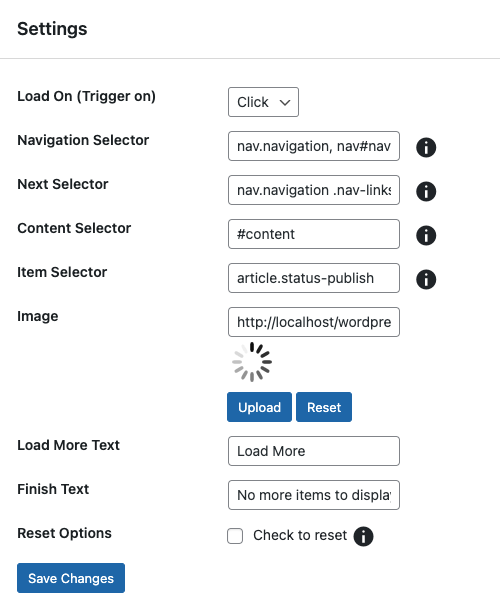
- From the “Catch Infinite Scroll” page, configure the following options:

- Loading trigger, where you can configure what would trigger the page loading. For infinite scroll, select the “Scroll” option. If you choose the “Click” option, the page will display the “Load More” button to the users.
- Image, where you can configure the image that should display when your web page is loading more content. You can add your customized image with this option.
- Finish Text, where you can specify the text that should display once the user has scrolled through the entire page content. For example, “End of content” or “Nothing more to show.”
- Once you have made these changes, click “Save” to add the infinite scroll to your WordPress site.
Conclusion
As you have seen, it’s quite easy to implement an infinite scroll on a WordPress site. However, infinite scrolling has its share of limitations and is not recommended for all types of websites.
With its specialized knowledge of WordPress, WePlugins is can provide you with a range of WordPress-related services like website development, plugin development, and WooCommerce development. Besides, we can help you with bug fixes and website speed optimization.
Want to know more about our services? Just drop us a message with your query.